Showing posts with label Gadgets. Show all posts

Thursday, September 20, 2012

Perfeo 7500HD - New Tablet PC

Perfeo 7500HD - new Tablet PC for users who value functionality and design.Comfort when reading e-books and surfing the Internet will provide an increase of up to 1024 * 600 resolution capacitive screen responsive 7 inch. For high performance gaming and smooth playback of HD-video meet 1.2GHz processor and a gigabyte of memory, with support for wireless mice, external drives, and HDMI-out the presence of the new tablet will compete even fixed game consoles and media players.

Modern "stuffing» 7500HD packed into the body with a special protective coating, made by technology IML. The tablet comes with an updated operating system Android 4.0.4 and a set of useful services of Yandex. Playback of video in any popular formats, including MKV.

Perfeo 7500HD tablet goes on sale in late September 2012 for a suggested retail price of 4590 rubles.

Key Features tablet Perfeo 7500 HD :
  • Color touch screen HD-7 "1024 x 600 16:9 (capacitive technology)
  • Accelerometer sensor for gaming and auto screen rotation
  • 1.2GHz processor Boxchip A10 (Cortex A8) with 3D accelerator (Mali 400)
  • 2M camera and secondary camera for video calling 0.3M
  • Android 4.0.4 OS with better support for video calls
  • Internal Memory: 1 GB of RAM DDR3 + 8GB NAND. A slot microSD (maks.32GB)
  • Built-in Wi-Fi 802.11 b / g / n. Supports external 3G modems
  • Li-Ion battery 3200mAch (up to 5-6 hours of video playback)
  • Size 193 * 124 * 11 mm. Weight 323 grams
  • Housing with protective cover IML
  • Cover color / frame color: gray / dark gray or white / red
  • Video formats: MKV, AVI, WMV, RM, RMVB, 3GP, MP4, ASF, VOB, MPG, MOV up to Full HD 1080p (when connected via HDMI - to Super HD/3D 2160P)
  • Pre-installed software: services Yandex.Maps, Yahoo Yandex.News, Yandex.Weather, clients of social networks, E-Book reader, video player, audio player, photo gallery
  • Supported the installation of new applications and games from Google.Play
Includes charger, USB cable and USB-host. 12 month warranty.

Saturday, September 15, 2012

How to Enable 3D on the HTC EVO 3D and Evo V whenever you want


For those of us who own an HTC EVO 3D, we tend to be hit, from time to time, with questions about our investments. Questions like, “why did Sprint take over a year to release something that was ready to go way before?” or “Will we be getting JB like the other devices that are getting it?” However, a question that more often than not plagues my mind as an owner of this device is, “Where else can I use the 3D display?” Being able to watch a few movies and play certain games in 3D is cool, but there should certainly be other things that can be done to take advantage of the panel technology—like a 3D interface, 3D wallpaper, and so on.

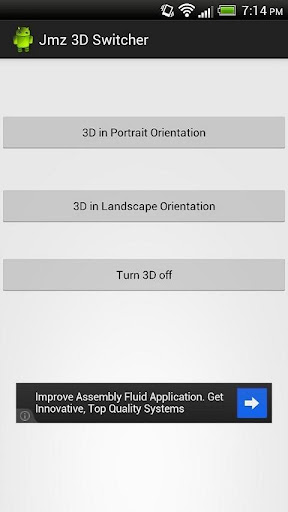
If you are thinking about these possible uses and more, here is a nice little app that will allow you to use 3D at all times during normal operation. Essentially, the app changes a value in the 3D panel controller, which turns it on and leaves it in that state. Due to rotation obviously being an issue with this (remember how the camera always complains whenever you try to take pictures while holding the phone vertically?), the app allows you to turn the 3D feature on either for landscape or portrait mode. The only one thing that can be somewhat cumbersome is that this app will render your light sensor useless and will boost and lock your brightness at 100%. This effect will go away as soon as you turn off the 3D functionality through the app.
So, if the idea of having actual 3D wallpaper makes you salivate, make sure that you try out this simple yet fulfilling app and leave some feedback for the dev.
 This app just echo’s a number in 3D_mode to enable complete device 3D. Either Landscape or Portrait.


Download link
JMZ Evo 3D - 3D Switcher

Sunday, July 8, 2012

XBOX 720 concept in pyramid shape

Xbox 720 Concept is a Pyramid With Two Kinect Eyes 

Federico Ciccarese created not only a sci-fi iPhone bracelet, but also an Xbox 720 concept, that you can see below. We’ve been hearing about a new Xbox console for a while now, so it would be high time for Microsoft to deliver, don’t you think? However, I don’t think that will happen till E3 2013 kicks off, at best… Luckily there’s Federico and his design!
As you can see the main system is an Xbox pyramid with two stereo pyramid Kinect cameras and a Windows Phone 8 smartphone integrated into the system. Everything is wireless and interconnected, with a very clean Metro UI style Xbox Live Dashboard that’s displayed on that TV, that may just be a piece of Microsoft hardware. Since Apple is rumored to make a HDTV, why not have Microsoft make a similar one? The whole theme of white and green is the defining image of the Xbox and it’s also kept here, with a very vivid phosphorescent green.
The handset looks like a Lumia 800/900 and I can see that this product is focused more on Kinect than anything else, since there’s no joystick around. Some people really like to feel the joysticks in their hands, you know? Anyway this futuristic design looks hot, but it’s very advanced for today’s standards. Maybe the Xbox 4 will be something like it…
Xbox 720 Concept is a Pyramid With Two Kinect Eyes

Wednesday, July 4, 2012

Textube - A Transparent mobile

Textube Mobile Texting Device is Transparent and Futuristic

Guillermo Callau created a very original communication device concept called Textube, based on text messaging and social networking. This is a mobile versatile texting device, that allows the user to receive and write short messages and thumbnail images. Textube relies on a translucent semi-rigid plastic with integrated electronic circuit.

Basically you have a rounded plastic piece of material in your hands, that’s both flexible and transparent. It also has some sort of lighting mechanism that makes it stand up through brightness. It also has integrated photovoltaic cells, that charge this gadget. Guillermo’s concept has flash memory, a solar powered battery and wireless connection with a global network. The flexible body of the communication device allows it to be rolled up, forming a tube that’s about the size of a bigger pen.

When the gadget is rolled up it becomes inactive and saves a lot of energy through that. I hope that unlike the picture, the concept’s interface is not only black and white and it’s also able to show colours.

Apple iWatch - A Multitouch watch with 8MP camera


Retina Display iWatch is a Multitouch Timepiece With 8MP Camera


 Swedish designer Anders Kjellberg envisioned a new Apple iWatch.

 Key Features :

  1. Retina display
  2. 8 megapixel camera
  3. FaceTime capabilities
  4. Apple watch records in HD and comes with support for iTunes, apps, Google Maps and lots of other usual apps available on the iPhone and iPod Touch.
  5. WiFi, Bluetooth, streaming music to headphones and a built in rechargeable Li-Ion battery
  6. Bluetooth 4.0 connectivity, has 16GB of storage to offer, App Store access, AirPlay support and charging/syncing via wireless.
  7. accelerometer on board, a proximity sensor and an ambient light sensor.
  8. 8 custom wristbands you can personalize your Apple Watch with


Retina Display iWatch is a Multitouch Timepiece With 8MP Camera

Saturday, June 30, 2012

Bliss Pad B8012: 8-inch tablet with Android 4.0

The company has released Nexus Bliss Pad B8012-media 8-inch plate on the latest operating platform, Android 4.0. Novelty has a cold and bright capacitive touchscreen TFT LCD-display size of 8 inches and a resolution of 800 by 480 pixels, 4:3 aspect ratio, and technology to support "multi" (five points of contact).

Hardware platform tablet Bliss Pad B8012 is Boxchip A10 Processor 1GHz (architecture ARM Cortex-A8) with Dual Mali-400 2D/3D core accelerator, which is used in the manufacture of tablets leaders. 3D-accelerator achieves excellent performance to a large extent "dispersing" the work of graphic applications.

Bliss Pad B8012 is equipped with 512MB of RAM DDR3, which uses less battery power and a higher clock speed, Flash-8GB of storage capacity, a slot for flash cards format microSD (support up to 32GB) front camera - with a resolution of 0.3 megapixels, adapter, Wi -Fi (802.11 b / g / n), mini USB2.0 port (OTG), mini HDMI - Ver 1.4 Output (Support 3D) 2160P HD, as well as the ability to connect an external modem, 3G EVDO / WCDMA.

Bliss Pad B8012 is capable of playing media from a variety of content on any USB-media. The creators of the tablet made sure that it was possible more convenient to use. Mini-USB connector lets you connect via an adapter external devices such as keyboard, mouse, 3G modem, flash drives, etc., which makes working with the tablet as a regular home PC.

Bliss Pad B8012 platform is based on Android 4.0. The tablet has adaptrovannuyu user shell: set app store for Android. Also, Bliss Pad B8012 pre-installed: JAVA, YouTube, Adobe Flash 10.3, alarm clock, calculator, calendar, scanner codes with the function of pattern recognition, text editor, some games, etc.

Enough to powerful battery (3.7V, 4400 mAh) will hold up to 6 hours of Wi-Fi and up to 4 hours when connected to an external 3G.

Bliss Pad B8012 dressed in a rugged housing with a metal back cover of dark silver color. At the bottom of the front panel is placed convenient hardware keys to control the tablet. At the end - on / off button (activation screen), "rocker" and the volume button "Home". At the bottom are all compact interfaces: a slot for flash card, mini USB port (OTG), the output mini HDMI, button Reset, 3.5mm jacks for stereo headphones, AC adapter. The speaker, an indoor Grille, located on the back of the tablet. Adequate weight and dimensions (mm 210h153h11.5) will be pleased with their owners.

Specifications Nexus Bliss Pad B8012
  • Dimensions 210h153h11, 5
  • OS, CPU, Memory
  • OS Google Android 4.0 Ice Cream Sandwich
  • Language Support for multilanguage
  • CPU Allwinner A10 Cortex A-8, 1 GHz
  • RAM 512M DDR3
  • Built-in 8GB memory Flzsh
  • 8 inch TFT LCD
  • Resolution 800X600
  • The capacitive touch panel, Multi
  • Graphics Processing Mali-400 3D accelerator OPEN GL VE 2.0
  • I / O One USB 2.0 OTG. Support: 3G modems, flash drives, mice, keyboards, etc.
  • TF (micro SD) Card reader, up to 32GB maximum.
  • 3.5 mm stereo headphones
  • Log in charge DC5V, 2A
  • HDMI Output
  • Speakers 8Ω/1W a speaker
  • Microphone Built-in microphone
  • Wi-Fi 802.11 b / g / n
  • Support for Ethernet USB_LAN card
  • 3G Support for external 3G USB modems WCDMA / EVDO
Additionally
  • G senor
  • Camera 0.3 Megapixel, front
  • Video Support AVI (H.264, DIVX, DIVX, XVID, rm, rmvb, WMV, MOV, MP4 (H.264, MPEG, DIVX, XVID), DAT (VCD), VOB (DVD), MPEG, MPG, FLV (H.263, H.264), ASF, TS, TP, 3GP, MPG
  • Audio Support MP3, WMA, MP2, OGG, AAC, M4A, MA4, FLAC, APE, 3GP, WAV
  • View pictures JPG, JPEG, GIF, BMP, PNG
  • E-Book Format TXT, EPUB, PDF, WORD, EXCEL, POWERPOINT
  • Battery 3.7V 4400mAch
  • Hours Wi-Fi -6 hours, 3G-4:00
  • Charging Input: AC100-240V.50-60HZ, output: DC5V 2A
  • Weight 515 g
Software
  • System APK Installer
  • Settings
  • Support for Adobe Flash 10.3
  • Internet explorer-ChromeLite, (xHTML 1.1 compliant, JavaScript 1.8 compatible)
  • JAVA
  • YouTube
  • Email
  • Web Video HTML5
  • Additionally Calendar
  • Alarm Clock
  • Calculator
  • Recorder
  • Notepad text editor
  • Google Keyboard input method or the method of entering the third-party
  • View photo picture Viewer

Wednesday, June 20, 2012

Minimalistic Blue Facebook Phone Has an Instagram Button

Minimalistic Blue Facebook Phone Has an Instagram Button


Created by Tolga Tuncer, the blue Facebook Phone shown below is much longer than it is wide, something that users of today’s large phones won’t appreciate. Just look at the Galaxy Note and HTC Titan for example and you’ll see huge width. And now meet a brand new Facebook concept phone:

Minimalistic Blue Facebook Phone Has an Instagram Button
The Blue Experience phone has an Instagram button and comes with a blue saturated aluminum casing (17.5 x 5.5 cm). It’s designed in as a wedge and the display is easy to view even when the handset is flat on the table. The display size and aspect ratio are optimized for the new Facebook core app OS. This social networking hub is all about communicating and sharing information and content.

Minimalistic Blue Facebook Phone Has an Instagram Button
At the top of the Facebook Phone we have an incoming message notification area and a button that allows access to the messaging center directly. There’s also an internal speaker output in here, audio jack and big old Like button at the front, like some sort of Home button. At the back there’s a camera with LED flash and Spotify is also integrated into this experience with a dedicated button on the left side. I think that this model is a bit too long to use… What do you think?
Minimalistic Blue Facebook Phone Has an Instagram Button

Nokia Lumia Concept Would Look Great With Windows Phone 8

Nokia Lumia Concept Would Look Great With Windows Phone 8 


if you’ve been following the tech news today, you probably know that Microsoft unveiled Windows Phone 8 and some of its features today. There was no new phone to showcase, aside from a prototype or two. However, the same Deviantart user who created this beautiful Microsoft tablet, Alextc1, now brings us a very nice and glossy Nokia Lumia concept.


This looks like a much thinner Nokia Lumia 800/900 with a special area for the Windows Phone buttons below the screen. That area reminds me of the similar design feature on Nokia Lumia 710, although it’s more separated from the screen area here. With such a look, this phone is probably very thing, maybe at 7-8mm in thickness. It has a camera button, On/Off button and volume buttons, all on the same side. With all those capacitive button-based phones out there, it’s good to see that physical keys still exist.

Add Windows Phone 8 in the mix here, 64GB of storage, a 12 megapixel PureView camera, LTE, a dual core Qualcomm Snapdragon S4 CPU and you’ve got the phone of the year right here! Would see this Nokia Windows Phone 8 concept turned real in stores this year?

Windows 8 Phone : Review


What a week for Microsoft. Having set the tech world ablaze with the Surface tablet, Microsoft are hoping to deliver similar excitement levels with Windows phone 8, codenamed Apollo, at its Windows Phone Summit event in San Francisco.
Microsoft has announced eight updates for its mobile OS, Each covering a raft of new features and functionality. Perhaps the most obvious is the new Start Screen, but multi-core processor and removable memory card support, shared native code between Windows Phone 8 and Windows 8, a revamped Internet Explorer 10 plus NFC and a new Wallet app are the key biggies.

Shared Native Code

Windows Phone 8 will share much of its code with Windows 8, making it easier for developers to create apps for both windows 8 PCs and phones. This mightn't be huge news for consumers but shared native code is a smart move that could allow Microsoft to leverage its strengths in the PC market onto the rapidly growing mobile space.

Multi-core CPU support

With IOS and Android hardware being launched with multi-core CPUs as a default specification, building Windows Phone 8 to support multi-core chips is a complete no-brainer.

Not only will it allow Windows Phone 8 to foot it with the iPhone and Android handsets, it'll also mean a far more responsive experience for users.

Storage

Last but by no means least on the hardware front, Windows Phone 8 will also support microSD cards. Whilst this has been a default for Android for some time, Win Phone 8 users will be able to add a MicroSD to transfer information from their PC to their phone, and from phone to phone.

NFC

Windows Phone 8 will also support NFC (near-field contactless) data sharing. This is potentially huge when taken alongside the newly announced Wallet feature. Tapping a Win phone 7 device against an NFC enabled PC, tablet, or even cash register will not only allow users to pay for goods and services, but to also instantly exchange contacts, webpages or even to redeem coupons or pay a bus fare.

MS-Wallet

Win Phone 8's Wallet hub is where users store credit and A™ cards, as well as third-party loyalty cards, plus coupon deals. It's verily similar to Apple's Passbook app and will also support NFC tap-to-pay. Here's wondering how long it'll take for New Zealand telcos, banks and businesses to get on board now that all three major phone platforms support NFC.

Whilst Google could argue they've had this for eons, Microsoft's Wallet feature see's card information stored on a secure SIM card rather than in system memory. This approach is what most telco's prefer (and they'll need to embrace it before it goes anywhere). A secure SIM also makes for more seamless transfers should you swap handsets (assuming your next handset also has Microsoft's Wallet built in). This is of course only ever going to be as useful as the number of merchants that support it.

Start Screen

Perhaps the most immediately noticeable feature in Windows Phone 8is the new Start Screen. Microsoft has taken its Live Tiles approach and given them a shot of steroids to make them highly customisable. Not only does the Start Screen take up the whole display it also features three different Live Tile sizes. Users will be able to choose between a small, medium and large size for Live Tiles. The entire screen is also available for Tile pinning so users can put more on their Screen.

CIO friendly

Microsoft has long had a huge share in the NZ business applications space, so pulling its desktop roots together with a bunch of enterprise friendly features should see MS consolidate its position as the top dog in the enterprise space. Windows Phone 8 will come with a Secure Boot and encryption (which is based on Windows Bitlocker). It'll also have make app distribution and deployment businesses, offering up a mechanism for private distribution and full-on onsite management. Managing Windows Phone 8 devices will also be able to be done via a software management system. And then there's Microsoft Office.

Bad news for Loyal Win Phone 7 Users

As compelling as the Windows Phone 8 features sounded at the launch event, one significant fact that should it prove to be true will mar an otherwise perfectly executed launch. According to a growing number of tech blogs, existing Win Phone 7 users won't be getting free upgrades to Windows phone 8. Instead they'll receive an upgrade to Windows phone 7.2 which will have the same start screen goodies but next to none of the other features listed above. Desperate to lift their market share, this more could see loyal Win Phone 7 users migrating to Apple or Android.

Samsung Galaxy Note II to arrive this October with Jelly Bean


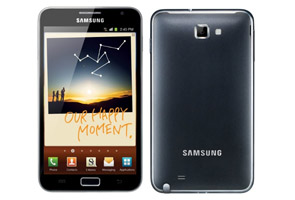
For the past few days, Samsung has been drawing quite a lot of attention with the Galaxy S III. Looks like the Korean company can't seem to get enough. Sources of a Korean publication (MK Business News) are suggesting that the Galaxy Note II is due to launch in October this year. Does that ring a bell? Yes, another phablet from Samsung.

The Korean manufacturer is planning to release the next version of Galaxy Note in time for Apple's launch of the next iPhone, which is also expected in the month of October.

The smartphone is expected to feature a thin unbreakable plane display (UBP) with a better display resolution and sport a slimmer design.

Other rumoured features include a quad-core processor, a 12MP camera, longer battery life and a sturdier build compared to its predecessor.

What's more, the smartphone is also likely to run on Jelly Bean, a successor to latest Android version Ice Cream Sandwich. We hope to see Jelly Bean debut at the Google I/O event that will take place at the end of this month.

Microsoft Surface Just Made the MacBook Air and the iPad Look Obsolete


Microsoft has guts. It's what you get when you're the underdog; either that or you curl into a RIM and die. Microsoft is the underdog because no matter how many hundreds of millions of people use its software, the cool and the future belong to Apple. Or belonged. After yesterday's Surface event—assuming they don't fumble the execution—Gates' children may have found the weapon to stop the heirs of Jobs and turn the tide. Or at least make things exciting for everyone again.

That weapon is Microsoft Surface. And it is beautiful. Beautiful and functional and simple and honest. Surface just bumped the MacBook Air and the iPad to the back seat, and it did so by hewing tightly to everything that Apple's Jonny Ive holds dear, according to the Ten Principles of his Jedi design master, Dieter Rams:

Good design principles for both hardware and software

• Good design is innovative

Surface uses a new manufacturing process—VaporMg—that reduces its weight while keeping it strong. That process also allows for a built-in kickstand, which is invisible when using the product in tablet mode. It may seem obvious, but it's innovative and enables its laptop mode easily. The same happens with the use of the cover as a keyboard—with its own design breakthroughs. And again with the combination of multi-touch and pressure sensitive pen technology in the Pro model. This is something that you can't find built in any tablet or computer today.
The software user experience is also innovative. It's not just an evolution of the Palm, or a Newton springboard. Metro's live tiles offer information in real time without having to launch apps. It allows for multitasking with split screens. It was created from scratch for touch but it also works with a physical keyboard and trackpad. Metro is, without a doubt, the most innovative user experience both on Earth and on the USS Enterprise.

• Good design makes a product useful

The touchscreen, the case keyboard and the built-in stand, together with the powerful Ivy Bridge brains in the Pro version, make Surface more useful than both tablets and ultrabooks. Surface adapts to your usage at any time, on the sofa or on your desk. In fact, it's the first morphing computer that actually makes sense.

This, too, extends to the software. Again, the live tiles, the multitasking, and Surface's ability to run full professional programs like Photoshop all open the scope of a computing device that can both entertain you and work for you at the same time.

• Good design is aesthetic

Surface is definitely aesthetic. This thing is beautiful when it's turned off—like the iPad and MacBook Air—and when it's turned on. Simple and sleek minimalism. The software has exactly the same attributes.

Everyone who has seen and touched it thinks the Surface itself is gorgeous. Metro is perfect for it: colorful, simple, without the horrible artifice of skeuomorphism omnipresent in OS X and iOS.

• Good design helps us to understand a product

Surface's hardware and software is self-explanatory. Three seconds with the product and you know how to transform it from tablet to ultrabook. Boot it and you will be able to fully understand Metro immediately, discovering its more advanced features quickly.

• Good design is unobtrusive

With Surface, there's nothing to get in your way. Hardware-wise, it's a tablet designed to be held, with angles that are comfortable in your hands. Microsoft claims that in ultrabook mode, the keyboard is better than any other keyboard—although the fact that they wouldn't let anyone touch it may belie that sentiment. But the keyboard is undeniably unobtrusive, disappearing every time you cover your tablet's display. And the built-in trackpad allows you to edit any part of a document without having to lift your hands off the keyboard. Fast. It's certainly more elegant than Apple's wireless accessory solutions.

Again, the same happens with Metro. It never gets on the way of the most important thing: your information.

• Good design is honest

Devoid of artifice, Surface and Metro are both designed to serve their respective functions. There's no gratuitious eye candy. Every curve, every part and notch in the hardware, is there to make its mission possible. In Metro, even the smallest animations have been designed to convey a meaning. Nothing is there just for fun. Unlike iOS and OS X, there are no artificial skins, no leather, no trying to fake real objects that are already obsolete in the real world.

• Good design is durable

Microsoft stressed that the VaporMg process is extremely durable. The screen glass is Gorilla 2, the best you can get right now. And the keyboard appears solidly built, too. Metro is also durable: it will stand the test of time because it doesn't use outdated visual metaphors. It's just transparent to the user, all information, no adornment. iOS feels dated next to it. Metro's user experience is one that I see going well into this century, for as long as we use touch screens.

• Good design is consequent to the last detail

Clearly, the philosophy of Surface is united across hardware and software. Everything responds to the same values. Every detail is part of a single idea and responds to all these principles.

This is where Apple fails. The hardware is consequent to the last detail. But the user experience is not consistent with the principles established in the hardware.

Objectively and comparatively, it's a mess. Ive's designs are tainted by Forstall's leather.

In fact, I'm convinced that Surface is the product that Jonny Ive would make if he had complete hardware and user interface design control at Apple.

• Good design is concerned with the environment

We don't have details about manufacturing, so I can't judge this one.


• Good design is as little design as possible

Both Microsoft and Apple's hardware follow this rule strictly. But Microsoft out-Apples Apple by taking this principle to the user experience too, as I explained above.
The design in Metro is as minimal as it can get, as opposed to the land of fake surfaces and shiny knobs in iOS or OS X. Information is God in the Metro universe, and every graphic element is there to show it in the clearest way possible. Or, said in a different way, there are no frivolous graphical elements to get in the way.

Excited? You should be

If Microsoft delivers—which means that the price and the battery life should be competitive with Apple's offerings, and that keyboard lives up to its billing—it has a real chance of stopping the seemingly unstoppable Apple empire. Or at least slowing it down.

If it fulfills its promise, if Microsoft Surface Pro is $800 or $900 and can pull six or seven hours of battery life, then things will change. It's going to be hard, since they don't have the app ecosystem yet, but that will come eventually. Microsoft has the user base, the developer base, and the deep pockets to make sure of that.

The only thing Microsoft was missing until yesterday just was a better platform. Now all the pieces are in place for a well-fought war, just like the good old days.

Come this fall, you will have two choices: 1) Get a MacBook Air for work and an iPad for play or 2) Get a beautifully designed, ultra-fast tablet with a sleek touch interface that can also be a full computer with the power of an ultrabook.

The iPad started a new era in computing but, for all its undeniable hardware innovation and beauty, it carries a legacy. It's a truly useful and fun color Newton on gorgeous, zippy hardware. And the MacBook Air is perhaps the perfect ultrabook, the pinnacle of Apple's laptop evolution. But, sadly, it runs an OS X/iOS Frankenlion. And it represents the end of an era, not the future. Both are extremely good and successful products but, when you look at them as a complete package of hardware and software, they fail to pass the stringent 10 Principles test advanced by Rams.

But Surface doesn't. It is new from the ground up. It's a coherent product that can be a tablet like the iPad and an ultrabook like the MacBook Air. A new product that merges the old and the new into something that seems to work quite nicely.

No, it's not the Second Coming of the Jesustabletbook. And yes, Apple will respond (I hope!) in kind. But Surface could be the first device to fulfill the promise of the New Computing Era ushered in by the iPad.

I'm excited. Not only because Surface looks great on its own, but because it signals a new drama in the struggle between Cupertino and Seattle—one that I've been following with many others since the 80s. The difference is that, once again, the classic players have switched roles. Apple is the winner but the prisoner of its own success and heritage. Microsoft is the underdog and has the freedom that only someone with nothing to lose can afford. I wonder if Apple would be bold and continue to innovate instead of just living from Job's heritage.

Whatever happens, a new war begins this fall. This is going to be fun.

LG launches Optimus 3D MAX and Optimus L7


LG Electronics has now officially launched two new Optimus devices - the LG Optimus 3D MAX and the Optimus L7 smartphones in India. Both these devices have been available on Flipkart for about a week now.

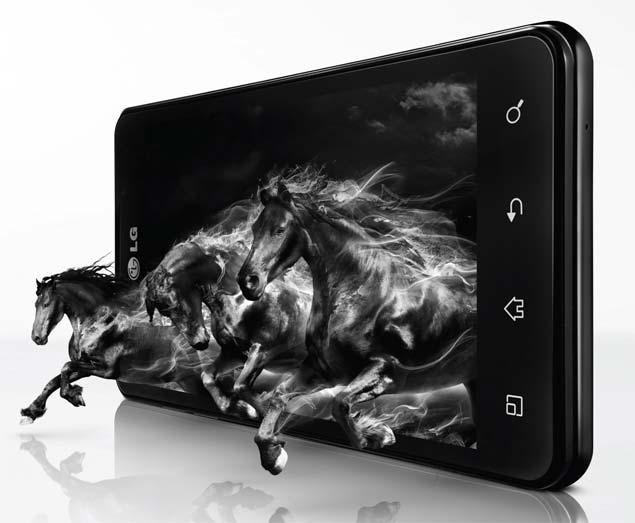
A successor to the LG Optimus 3D, the LG Optimus 3D MAX sports a 4.3-inch screen with WVGA resolution & NOVA Display. It is powered by a 1.2GHz dual-core processor, 1GB RAM, has 8GB of internal storage and two 5 MP cameras. Priced at Rs. 30,500 (Market Operating Price), the LG Optimus 3D MAX runs on Android 2.3 and has a 1520mAh battery.

Soon Kwon, President South West Asia Region & MD LG India shares, "With the Optimus 3D MAX, we want to set new standards of quality viewing and powerful performance on mobiles packed in a slim and modern design".

The other handset announced is the LG Optimus L7, which has a 4.3-inch display and runs on Android 4.0. LG Optimus L7 also has a 5MP rear camera but its front camera is 1.3 MP. Other features include a 1 GHz processor, 1 GB RAM and onboard storage on 4 GB. The MOP of this smartphone is Rs. 19, 900.

"Design is consistently an important factor for customers when choosing a mobile phone and with L-Style we're going to go back to our roots as a company focused on products that fit into the lifestyle of customers," adds Kwon.

LG Optimus 3D Max P725 key specs:
  • Android 2.3
  • 5 MP camera
  • 0.3 MP front camera
  • 4.3-inch TFT LCD
  • 1.2 GHz dual-core processor
  • Expandable storage capacity up to 32 GB
  • 1520 mAh battery
LG Optimus L7 P705 key specs:
  • Android 4.0
  • 5 MP camera
  • 0.3 MP front camera
  • 4.3-inch LCD
  • 1 GHz processor
  • Expandable storage capacity up to 32 GB
  • 1700 mAh battery

Samsung Galaxy S III vs Apple's iPhone


Until I started watching videos on Samsung's new Galaxy S III phone, I never thought of the iPhone's display as small.

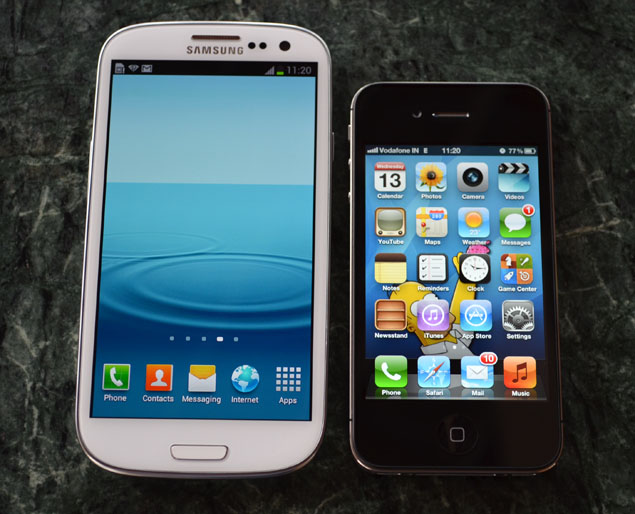
The Galaxy's screen measures 4.8 inches diagonally, compared with 3.5 inches for the iPhone. That translates to a display area that's nearly twice the size. Yet the Galaxy is thinner and lighter.

Apart from that, the Galaxy shares the iPhone's curvy and shiny design, along with a center button that wakes up the device from power-saving mode or takes you from whatever you're doing to a home screen.

Unlike the iPhone, the Galaxy runs on faster 4G cellular networks (AT&T markets its iPhones as 4G, but the network is based on older technology). The Galaxy also comes with a new wireless technology called near-field communications, which can be used to share files and make purchases.

Pictures taken with the Galaxy were sharper and had better light balance than those with the iPhone, based on a handful of test shots I took. The Galaxy's tool for measuring data usage - for those of us no longer on unlimited plans - surpasses what comes with the iPhone.

All that makes the Galaxy a strong contender to Apple's popular device.

I understand the comparison isn't entirely fair. The iPhone 4S is about eight months old, and there's a new model expected this fall. Last week, Apple previewed changes to the phone's operating system, promising improvements to its Siri virtual assistant, a mapping service with voice navigation and more.

But the reality is the new Galaxy is available this week - not in September or October.
All four national wireless companies and regional carrier U.S. Cellular will sell the Galaxy, which runs the latest operating software from Google, a flavor of Android known as Ice Cream Sandwich.

The basic model with 16 gigabytes of memory will cost $200 with a two-year contract through AT&T, Verizon Wireless, Sprint and U.S. Cellular. That's comparable to the iPhone's $199. A 32 GB model will cost $250, which is cheaper than a comparable iPhone at $299. T-Mobile will charge at least $30 more than others, though it may still be cheaper overall with lower monthly data fees over two years.

The Galaxy phones will be available in white or blue. AT&T will also have a red version this summer, but it won't carry the 32 GB model.

sgs3-iphone4s-flat.jpgNow back to Galaxy's screen.

The Galaxy shines when displaying widescreen video. That's because much of the display's increase is in width rather than in height when the phone is held on its side, or landscape mode. The iPhone wastes some display real estate to make wider videos fit. There are unused strips of black above and below those videos.

When watching a foreign movie through a Netflix app, the Galaxy's larger screen makes the subtitles much easier to read. I can read them fine on the iPhone, but my eyes kept zeroing in on the text to do so, making me miss the action.

The colors on the Galaxy also appeared richer, thanks to a screen that uses organic light-emitting diodes, rather than a standard LCD.

All that video can deplete your data allowance in no time.

On the iPhone, the tool for measuring data usage isn't easy to find. You have to choose "General" in your settings, then "Usage," and then "Cellular Usage." There's info there on the amount of data sent and received, but no total. You have to remember to manually reset the counter each month on the day your billing cycle starts.

On the Galaxy, "Data usage" is the third item from the top under "Settings." You can tell the phone when to warn you that you're about to reach your cap for the month. You can also automatically disable data usage when you've reached a pre-specified point to avoid extra charges. You don't have to do any math to get the total used, and the counter automatically resets each month. You can also see which apps use the most data.

Before I go further, I'll say a few things about where the iPhone still excels.

  • The iPhone has more software from outside parties, extending the device's functionality. Many apps are written only for the iPhone and other Apple devices. Versions for the Galaxy and other Android phones sometimes come months later and lack all of the features.
  • The iPhone works better than Android devices in corporate settings. Android, for instance, lacks the tools needed to access Wi-Fi at my office or the corporate email system (though some might consider that a plus for Android).
  • The iPhone has Siri, the virtual assistant that hears your voice commands and talks back.
The Galaxy introduces a voice assistant, but she's best described as Siri's forgotten stepchild. The Galaxy couldn't find an Indian restaurant just a block from me, and she gave me the name of a doctor when I asked for Thai restaurants. The Galaxy also lacks Siri's attitude and sense of humor.

Me: "What is the best smartphone?" Siri: "Wait, there are other phones?"
The Galaxy replied with the grammatically incorrect and boring, "Opinion vary but I think Samsung Galaxy is the best of them all."

Here's where the Galaxy prevails:
  • As with other Android devices, the Galaxy syncs well with Google services. By signing into a Google account, names, emails and phone numbers from my Gmail contacts are automatically transferred to the phone. The same happens with calendar entries. Apple uses a separate contact and calendar system, not the one I already use through Google.
  • You can remove the plastic back cover to switch the battery or insert a microSD card for additional storage of up to 64 gigabytes. The iPhone's battery can be replaced only by a technician, and there's no slot for more storage.
  • Both devices have two cameras, including an 8 megapixel one in the back. The Galaxy's front-facing camera does more than take pictures: When you're reading something, the camera will see your eyes glued on the screen, so your phone won't switch to power-saving mode. The iPhone's screen will start to dim if you don't touch it periodically.
  • If you're texting a friend and find it easier to discuss something by phone, the Galaxy will automatically call that person when you put the phone by your ear.
  • When watching video stored on your device, there's a "pop out" feature that lets you watch in a smaller window while doing other things such as email and Facebook on the phone.
  • The Galaxy's near-field communications technology offers a preview of the future. One day, it could be common like Wi-Fi and Bluetooth. With it, I'm able to share photos and video simply by tapping the backs of two Galaxy phones together. I'm also able to make purchases at a handful of stores by tapping the phone to the merchant's NFC reader, as long as I have credit cards set up through the Google Wallet app.
Alas, Google Wallet isn't so useful until more merchants accept it, and the app is only available on the Sprint model of the Galaxy.

Basic sharing features, which let you swap small files, work with some other late-model Android phones. If you tap two Galaxy phones together, you can quickly transfer really big files, such as videos and photos.

All Galaxy models except T-Mobile's will be able to use so-called fourth-generation, or 4G, networks. T-Mobile doesn't have a 4G network, but its 3G network is almost as fast as a 4G network (and indeed, it calls its network "4G").

Current iPhones don't work with 4G technology, though the AT&T version says it does because it uses an upgraded 3G network, much like T-Mobile's. The iPhone coming this fall is likely to support "real" 4G, using a technology called LTE.

The next iPhone will also have an Apple-designed mapping service with turn-by-turn directions spoken aloud. It's one of the rare instances where the iPhone will play catch-up to Android, which has had Google's voice navigation app built-in since 2009.

If you're an iPhone owner looking for a new phone, I'd wait a few months and make a comparison then.

If you're an Android user looking to switch to an iPhone, the Galaxy offers enough reason to stick with Android. You'll miss out on the cachet of owning an iPhone or the joys of chatting with Siri, but you'll get a solid device with the latest technologies.